
Ищете альтернативу Kaiber? Сохраните одного персонажа в каждом клипе
Kaiber (kaiber.ai) это творческая ИИ-платформа, где вы создаете видео и изображения на холсте с несколькими моделями. RYLA идет другим путем: вы создаете нового персонажа в пошаговом конструкторе, фиксируете его лицо в референсном листе и генерируете этого же персонажа в фото, видео и говорящих клипах.
Что выбрать?
you want to design a recurring character step by step (niche, look, outfit, personality, voice), lock its face in a reference sheet, and generate its photos, video, talking clips, and video swaps in one workspace
you want to work with several image and video models, such as Seedance, Kling, and Nano Banana, inside one canvas
Где выигрывает каждая платформа
Kaiber presents itself as an AI creative platform. Its help center describes generating video and images in Kaiber Canvas with several models, and names Seedance 2.5, Kling 3.0 Standard, Nano Banana, and Recraft SVG in its guides. RYLA starts from the character instead: you design a new one in the builder, without uploading photos of anyone, and generate new content from that one character. These are different jobs, so the table shows where each fits rather than declaring one better overall. Facts about Kaiber come from its public help center, as of 13 November 2026; its plans and prices are not compared here, so check them on its own site. RYLA plans come from the RYLA pricing page. The table includes the rows where Kaiber is ahead.
| Feature | RYLAРекомендуем | Kaiber |
|---|---|---|
| Plans | Monthly plans from Basic at $34.99 a month; credits and character limits are on the pricing page. | Plans and credit prices are on its own site; not compared here. |
| Choice of generation models | Image-to-video of your character, talking avatar clips with the voice chosen in the builder, and video swap, without a per-model picker. | Its help center describes working with several models in Kaiber Canvas, including Seedance 2.5, Kling 3.0 Standard, Nano Banana, and Recraft SVG. |
| Canvas workspace | Photos, clips, and swaps are made one by one in Studio, Avatar Video, and Video Swap; there is no storyboard canvas. | Generation happens in Kaiber Canvas, a workspace its help center describes throughout. |
| Design a new character from scratch | A step-by-step builder: niche, gender and style, ethnicity, age, skin, eyes, face shape, hair, outfit and scene, personality and name, then a voice. | A character builder is not described in the help-center pages read for this page. |
| Keeping one face consistent |  After the builder you pick a base image, and RYLA generates a reference sheet of that face that new content is made from. | How it keeps one face consistent across separate clips is not compared here. |
Колонка RYLA показана, а не просто заявлена. Строки, где заявлена цена или условие, намеренно без изображения.
Одно лицо в четырёх разных сценах
Каждое изображение здесь создано с RYLA. Один персонаж, четыре разные сцены, без ретуши между ними.



Где выигрывает RYLA
Ваши фото не нужны
Конструктор RYLA начинается с персонажа, которого вы создаете, а не с загруженных фото. Вы выбираете нишу, внешность, образ и сцену, затем характер, имя и голос, а RYLA генерирует базовые изображения на выбор.
Одно лицо, зафиксированное в референсном листе
Вы выбираете одно базовое изображение персонажа, RYLA создает референсный лист этого лица, и новые фото и клипы делаются из этого листа.
Фото, видео и говорящие клипы одного персонажа
После завершения Studio генерирует новые фото по шаблонам, изображение в видео оживляет статичный кадр, Avatar Video создает говорящие клипы с голосом из конструктора, а видеозамена помещает того же персонажа в готовый клип.
Честно о разрыве
Kaiber объединяет несколько моделей изображений и видео на одном холсте. Если вам нужно переключаться между моделями в одном рабочем пространстве, он справляется с этим прямее, чем RYLA сегодня.
Где всё ещё выигрывает Kaiber
Kaiber is ahead on model variety and workspace. Its help center describes several video and image models inside one Canvas. RYLA has no canvas and no per-model picker: photos, clips, and swaps are made one by one in Studio, Avatar Video, and Video Swap. If you want to try the same idea in several models, Kaiber fits that job more directly.
Переход с Kaiber на RYLA
There is no import between the two products, so switching means building your character once in RYLA. This is the actual sequence in the RYLA builder:
- Pick a niche, then gender and style.
- Set the look: ethnicity, age, skin, eyes, face shape, and hair.
- Choose outfit and scene, then personality and a name, then a voice.
- Generate base images and pick the one that becomes your character.
- RYLA generates a reference sheet of that face.
- Finalize, then create new photos in Studio, motion with image-to-video, talking clips in Avatar Video, and swaps in Video Swap.
Here is one RYLA character from the showcase on this site, generated in two different scenes:

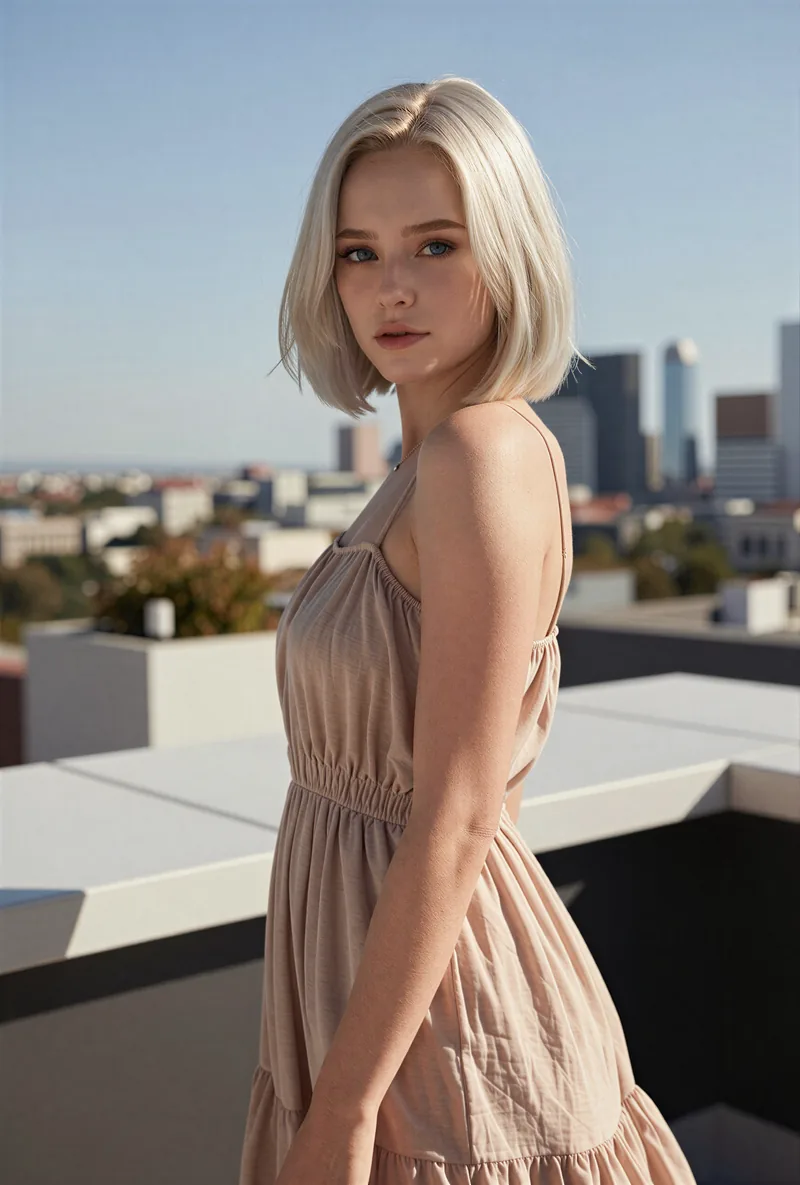
If you liked a look you made on Kaiber, use it as your brief in step 2. Current plans are on the pricing page. For other comparisons, see the Eromify alternative and RYLA vs Higgsfield pages.
Вывод
Choose Kaiber if you want to work with several image and video models in one canvas. Choose RYLA if you want to design one new character in detail, lock its face in a reference sheet, and generate its photos, video, talking clips, and video swaps in one workspace. RYLA is not affiliated with, endorsed by, or connected to Kaiber; the name Kaiber is used on this page only to identify that service.