
Looking for an Anam Alternative? Design One Character, Not a Conversation Agent
Anam (anam.ai) is a platform and API for real-time interactive AI avatars, built to give a face to an AI agent. RYLA is built for a different job: you design one new AI character in a step-by-step builder, lock its face in a reference sheet, and generate that same character across photos, video, and talking clips.
Which One Should You Use?
you want to design a new AI character step by step (niche, look, outfit, personality, voice), lock its face in a reference sheet, and generate its photos, video, talking clips, and video swaps in one workspace
you want a live, conversational avatar inside your own product or support flow, connected to your own AI agent through a widget or an API, billed by the minute
Where Each Platform Wins
Anam and RYLA both involve AI avatars, but they solve different problems. Anam describes itself as a way to build real-time interactive AI avatars: a live avatar that talks with your users, connected to your own agent through a no-code widget or an API, with SDKs for JavaScript and Python. RYLA starts from a character you design: you build one new face step by step, without filming anyone, and generate photos, video, and talking clips of that one character. Facts about Anam come from its public homepage and pricing page, as of 24 October 2026. RYLA plans come from the RYLA pricing page. The table includes the rows where Anam is ahead.
| Feature | RYLARecommended | Anam |
|---|---|---|
| Primary job |  Design one recurring AI character and generate its photos, video, and talking clips. Design one recurring AI character and generate its photos, video, and talking clips. | Real-time interactive avatars: a live face that holds a conversation, added to your own AI agent. |
| Free plan | Paid plans; current plans and credits are on the pricing page. | A Free plan with 30 minutes, 1 concurrent session and a 3-minute conversation limit; commercial use is not included on Free. |
| Paid plans | Monthly plans from Basic at $34.99 a month; credits and character limits are on the pricing page. | Starter at $12 a month (50 minutes), Explorer at $49 (250 minutes), Growth at $299 (2,000 minutes), Professional at $999 (8,000 minutes), and a custom Enterprise plan. |
| How usage is billed | Credits come with the plan; current options are on the pricing page. | By the minute: each plan includes monthly minutes, paid plans bill extra minutes at a per-minute rate, and unused minutes do not roll over. |
| Live conversation and developer access | Not offered; RYLA makes photos, pre-made video, and talking clips rather than a live conversation. | A no-code widget or an API, with SDKs listed for JavaScript and Python, and API access on every plan. |
| Languages | Not compared here; current features are on the pricing page. | 70+ languages listed on all plans. |
| Design a new character from scratch | A step-by-step builder: niche, gender and style, ethnicity, age, skin, eyes, face shape, hair, outfit and scene, personality and name, then a voice. | A library of avatar styles (3D, photorealistic, anime, comic book) or your own uploaded image. |
| One face across photos and video |  After the builder you pick a base image, and RYLA generates a reference sheet of that face; Studio photos, image-to-video, and talking clips are made from it. After the builder you pick a base image, and RYLA generates a reference sheet of that face; Studio photos, image-to-video, and talking clips are made from it. | Built around live avatar sessions; photo generation of one recurring character is not described on its pricing page. |
The RYLA column, shown rather than claimed. Rows whose claim is a price or a policy carry no image on purpose.
The Same Face in Four Different Scenes
Every image here was generated with RYLA. One character, four different scenes, nothing retouched in between.


Where RYLA Wins
No Recording of Anyone Needed
RYLA's builder starts from a character you design, not from a video or photos of yourself. You choose niche, look, outfit and scene, then personality, name, and voice, and RYLA generates base images to pick from.
One Face, Locked in a Reference Sheet
You pick one base image of your character, RYLA generates a reference sheet of that face, and new photos and clips are made from that sheet.
Photos, Video, and Talking Clips of One Character
After finalizing, Studio generates new photos from templates, image-to-video puts a still in motion, Avatar Video creates talking clips with the voice chosen in the builder, and video swap places the same character into an existing clip.
Honest About the Gap
Anam offers a free plan, a live conversational avatar, a widget and an API for developers, and 70+ languages. RYLA does not offer those. If you need a face for your AI agent, Anam covers it more directly.
Where Anam Still Wins
Anam is ahead for live, conversational avatars, and it is worth saying so plainly. It gives your AI agent a real-time face, connects through a no-code widget or an API with SDKs, lists 70+ languages, and has a Free plan. RYLA does not offer a live avatar, an API for it, or a free plan. If you need an avatar that talks with your customers in real time inside your own product, Anam is built for it and RYLA is not.
Switching from Anam to RYLA
There is no import between the two products. If you use Anam for a live agent face and also want one recurring AI character for a social feed, you build that character once in RYLA. This is the actual sequence in the RYLA builder:
- Pick a niche, then gender and style.
- Set the look: ethnicity, age, skin, eyes, face shape, and hair.
- Choose outfit and scene, then personality and a name, then a voice.
- Generate base images and pick the one that becomes your character.
- RYLA generates a reference sheet of that face.
- Finalize, then create new photos in Studio, motion with image-to-video, talking clips in Avatar Video, and swaps in Video Swap.
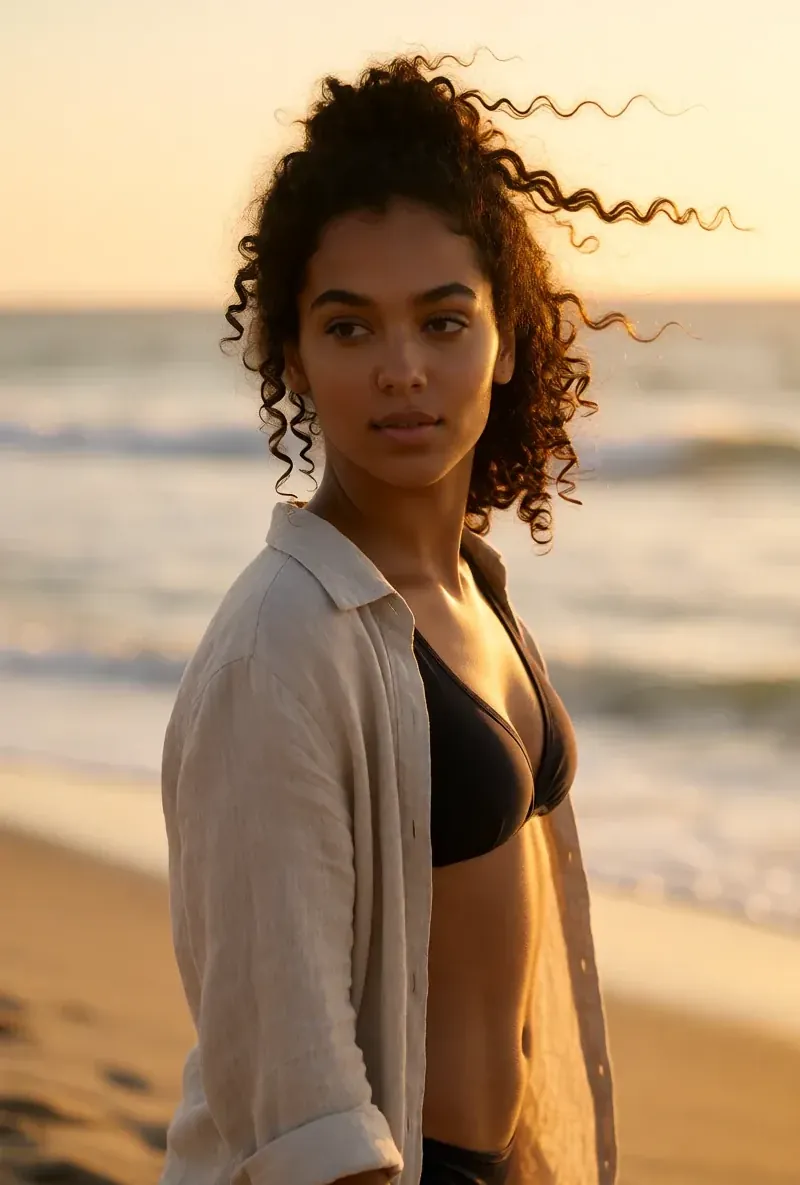
Here is one RYLA character from the showcase on this site, generated in two different scenes:

Current plans are on the pricing page. For other comparisons, see the HeyGen alternative and Tavus alternative pages, or the talking avatar page.
Verdict
Choose Anam if you want a live, conversational avatar inside your own product, a widget or an API, many languages, or a free plan to start. That is its product, and RYLA does not offer it. Choose RYLA if you want one new AI character that you design step by step, with its face locked in a reference sheet and its photos, video, talking clips, and video swaps made in one workspace. Some teams reasonably use both. RYLA is not affiliated with, endorsed by, or connected to Anam; the name Anam is used on this page only to identify that service.